Unlock Simple, Secure PDF Conversion — Directly in Your Browser
Chrome, Edge, and Firefox Android
Get the Extension Now
Download Image to PDF Converter for your favorite browser:
Imagine this — you're browsing the web, find an article, an image, or even a set of photographs. You want to save them, archive them, share them, or just view them offline. Instead of copying, pasting, or using clunky third-party tools, what if you could transform them into a polished PDF — instantly, with one click, and entirely on your device?
That's exactly what Image to PDF Converter : Save as Pdf offers. And now, you don't have to be tied to Chrome alone — it's available on multiple browsers and platforms.
Why This Extension?
✅ One-Click PDF Downloads (From Webpages)
With just a single click — "Convert Current Page to PDF" — the extension uses your browser's native PDF engine to generate a fully formatted, high-quality PDF version of the page. Text, images, layout, links — everything is preserved. No distortions, no missing elements. What you see is what you get.
For busy professionals, students, researchers, or anyone who reads online — this means you can archive articles, blogs, news, reports, or anything valuable with lightning speed.
🖼️ Image Conversion — Not Just Webpages
Need to convert a screenshot, JPG, PNG, WebP, or any image you have into PDF? You're covered. The built-in "Quick Image Converter" lets you transform images instantly, offline — no uploads, no cloud processing, no online servers.
This is perfect for:
- Photos from your phone or camera
- Scanned documents
- Design mockups
- Screenshots or graphics
Convert with a few clicks — and download immediately.
🗂️ Local PDF Viewer Built-In
Beyond just conversions, the extension lets you view local PDF files directly in your browser — no need for extra PDF reader software. Upload a PDF from your computer, and it opens immediately inside your browser. Simple, clean, and efficient.
🔒 Fully Offline & Privacy-Focused
All conversions — webpage → PDF, image → PDF, or image format conversions — occur entirely on your device. Nothing gets uploaded to servers. That means sensitive documents, personal photos, or confidential receipts stay private. The extension does not collect or transmit your data. Security and confidentiality are baked in.
⚡ Fast, Lightweight & Efficient
No heavy software. No waiting for uploads or downloads. Since it leverages your browser's native PDF engine, conversion is fast and resource-efficient. That means your laptop, PC, or mobile won't slow down. And whether you're on a stable connection or offline — it works.
📚 An All-In-One PDF Toolbox
Why juggle multiple tools when one works for all? With this extension you get:
- Webpage to PDF (one-click)
- Image to PDF (quick image converter)
- Local PDF viewing
- Direct links to more advanced PDF utilities — compress, split, merge, convert Word/PPT to PDF, extract images, and more (via linked external tools)
One extension, multiple uses. All neatly packed.
Who Needs This — And Why They'll Love It
📖 Students & Academics
- Save research articles, blogs, lecture notes, or web tutorials as PDFs for offline reading or printing.
- Convert scanned notes or hand-written photos into PDFs for easy sharing or archiving.
👨💼 Professionals & Remote Workers
- Download receipts, invoices, reports, or contracts as PDFs directly from the web.
- Merge multiple images (e.g. scanned documents) into a single PDF file — perfect for submission, sharing, or record-keeping.
🗂️ Everyday Users & Digital Minimalists
- Save favourite recipes, travel itineraries, or how-to guides from the web for offline access — uncluttered, neatly formatted.
- Convert screenshots or photos into PDFs to share with friends, family, or clients.
🎨 Designers, Content Creators, Freelancers
- Convert design drafts, mockups, or images into PDF portfolios or previews.
- View client PDFs without installing extra software — directly in your browser.
🛡️ Privacy-Conscious Users
- If you work with confidential documents, personal photos, or sensitive data — offline conversion means zero risk of leaks.
- No file upload, no server storage, no third-party exposure.
How It Works — Effortless Workflow
- Install the extension — One click, depending on your browser.
- When viewing a web page you want to save: click the extension icon → "Convert Current Page to PDF" → download your file.
- To convert an image: open Quick Image Converter → choose image(s) → select output (PDF / JPG / PNG / WebP) → convert → download.
- Need to open a PDF already on your device? Use "View Local PDF" — select the file → view instantly in browser.
- Need more advanced PDF tools? Use the "More PDF Tools" section to quickly access compress, split, merge, Word-to-PDF, PDF-to-Word and more.
No plugins, no logins, no subscriptions. If your browser works, this extension works.
Available Browsers — Get It Where You Work
- Google Chrome — install directly from the Chrome Web Store.
- Microsoft Edge — get it via the Edge Add-ons store: https://microsoftedge.microsoft.com/addons/detail/image-to-pdf-converter-/pocgdifigllbdfpkplhhghljnbnlgkld
- Firefox Android — install the compatible version via Mozilla Add-ons: https://addons.mozilla.org/en-US/android/addon/web2pdf-converter-save-as-pdf/
No matter your device or browser — you can enjoy the same fast, private, offline conversion capabilities.
Common Use Cases
- 📄 Archiving Content — bloggers, journalists, and avid readers can save articles or research material for offline reading or citation.
- 🧾 Document Submission — scan photos of documents (e.g. bills, certificates), convert them to PDF, combine multiple images into one file, and send as a professional-looking document.
- 🗂️ Organizing Visual Projects — photographers or designers can convert a batch of images into PDF portfolios or mood boards.
- ✈️ Travel Planning — save web itineraries, booking confirmations, maps, or hotel pages as PDFs — accessible even without internet.
- 🖨️ Print-Friendly Archiving — convert webpages or images to PDFs for printing or offline storage.
- 📚 Study Materials — students can compile images, slides, notes, and web resources into a single PDF for easy review.
What Makes Image to PDF Converter Different
While there are many online tools and services offering image-to-PDF or webpage-to-PDF conversion — such as web-based converters or even manual "Save as PDF" via browser printing — Image to PDF Converter stands apart because:
- It works entirely offline — no uploading your images or pages to external servers; your data never leaves your device.
- It leverages your browser's native PDF engine, delivering high-quality output without heavy resource usage or extra software.
- It combines multiple tools — not just webpage savings or image conversion, but also local PDF viewing and quick access to advanced PDF utilities.
- It's designed to be user-friendly — minimal clicks, intuitive interface, and no technical expertise required.
- It's versatile across browsers — Chrome, Microsoft Edge, and Firefox Android.
- It's privacy-centric — ideal for anyone working with sensitive documents.
Unlike many online converters that demand file upload (raising privacy concerns), or manual "Print to PDF" workflows that require configuring settings — this extension is seamless, fast, and secure.
How It Works
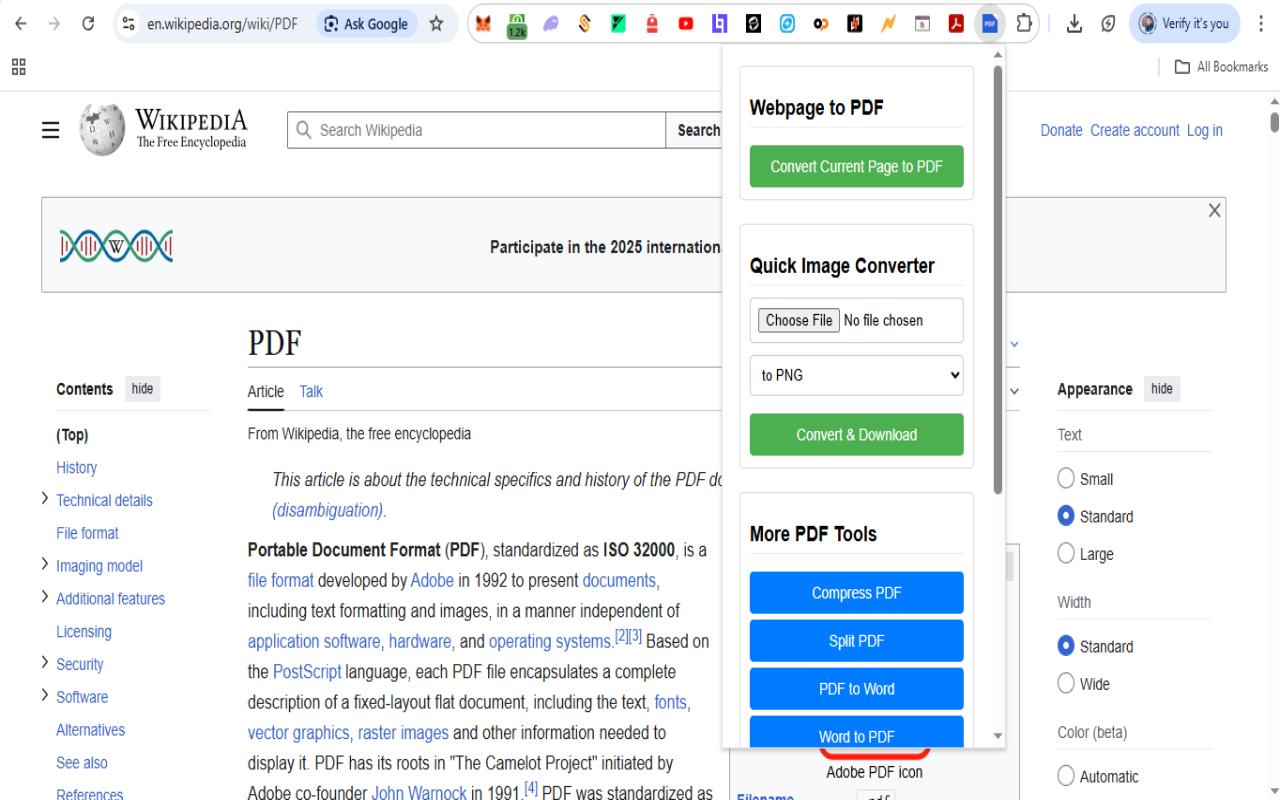
Step 1: Visit Any Webpage
Open any webpage or image you want to convert to PDF in your browser.
_1764434629881.jpg)
Step 2: Click Extension Icon
Click the Image to PDF extension icon in your browser toolbar to open the conversion panel.
_1764434629825.jpg)
Step 3: Convert to PDF
Select conversion options and click 'Convert & Download' to instantly create your PDF file.
_1764434629768.jpg)
Step 4: Download & View
Your PDF is ready! Download it instantly or view it directly in your browser.
Available for Your Favorite Browser




FAQs — What People Usually Ask
Real Benefits You'll Actually Feel
- 🔁 Instant gratification — Convert and get a PDF in seconds, no waiting, no loading bars.
- 🔐 Peace of mind — Sensitive docs and personal photos stay private; no third-party servers involved.
- 🧑💻 Streamlined workflow — From webpage to PDF to local viewing — all in one place; no jumping between apps.
- 📂 Declutter & organize — Compile scattered images, webpages, screenshots into clean, shareable PDF files.
- 🌍 Work anywhere — Whether at home, office, or on the go — offline functionality ensures you're never stuck without connectivity.
- 🪶 Lightweight & fast — No heavy installs, no system slowdown. Ideal for older PCs or low-resource devices.
- 📱 Cross-browser & cross-device — Whether on desktop Chrome/Edge or mobile Firefox Android — enjoy consistent PDF tools everywhere.
Try It Today — And Transform How You Manage Content
Stop juggling multiple tools, avoid risky online upload services, and say goodbye to messy workflows. Whether you're saving a blog post for offline reading, converting screenshots for a project, organizing your documents, or archiving research — Image to PDF Converter : Save as Pdf makes it effortless.
Get it now:
- Chrome — install from Chrome Web Store
- Edge — install from Edge Add-ons store
- Firefox Android — install from Mozilla Add-ons
Then: open any webpage or image → click "Convert to PDF" → download and enjoy your PDF.
That's it. Instant, safe, efficient — and available on your browser of choice.
Start using it today, and discover how simple PDF management — and digital organization — can be.